用OpenID Connect(OIDC)来保护使用不记名令牌授权的服务应用
You can use the Quarkus OpenID Connect (OIDC) extension to secure your JAX-RS applications using Bearer Token Authorization. The Bearer Tokens are issued by OIDC and OAuth 2.0 compliant authorization servers, such as Keycloak.
Bearer Token Authorization is the process of authorizing HTTP requests based on the existence and validity of a Bearer Token. The Bearer Token provides information about the subject of the call which is used to determine whether or not an HTTP resource can be accessed.
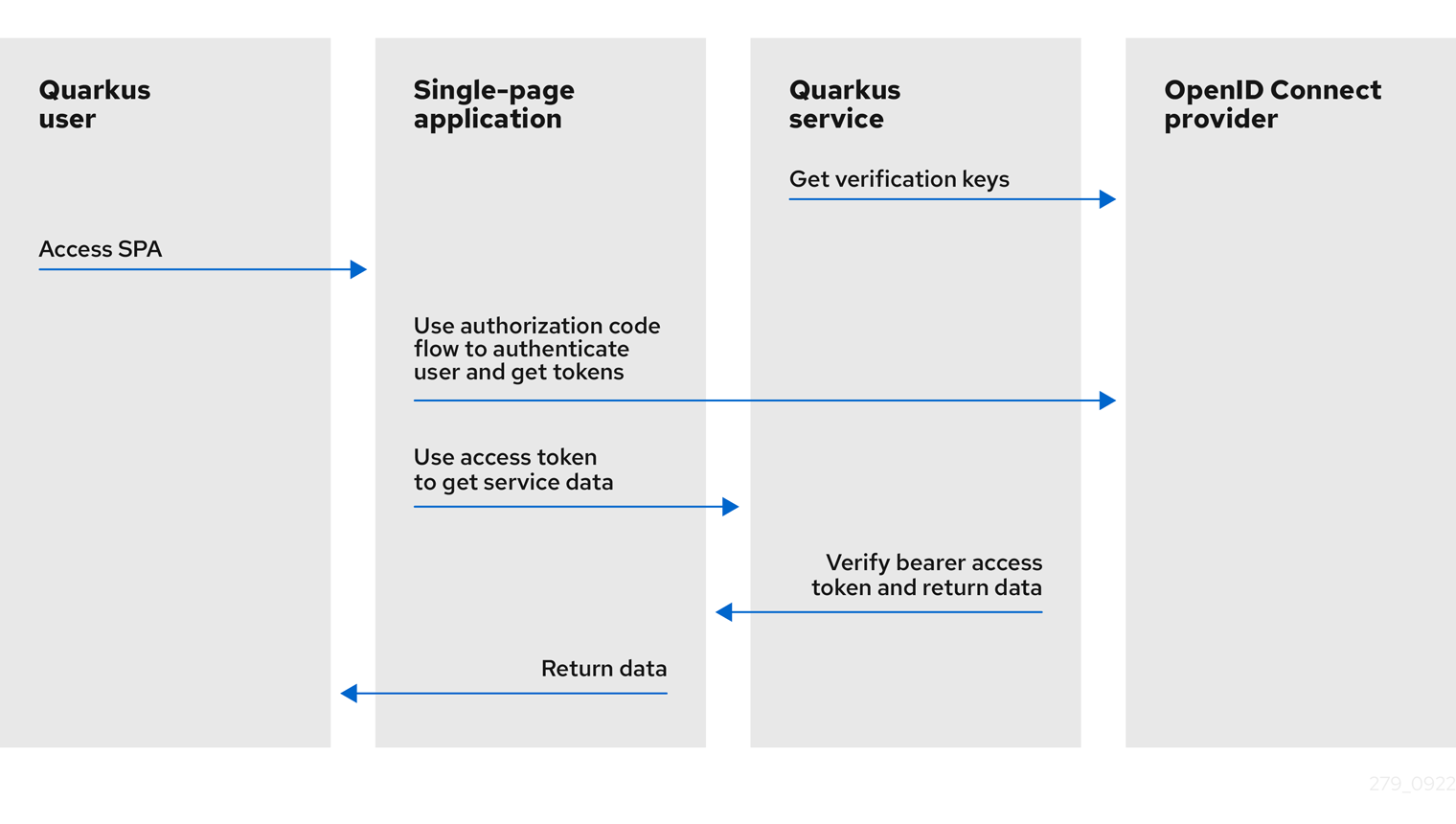
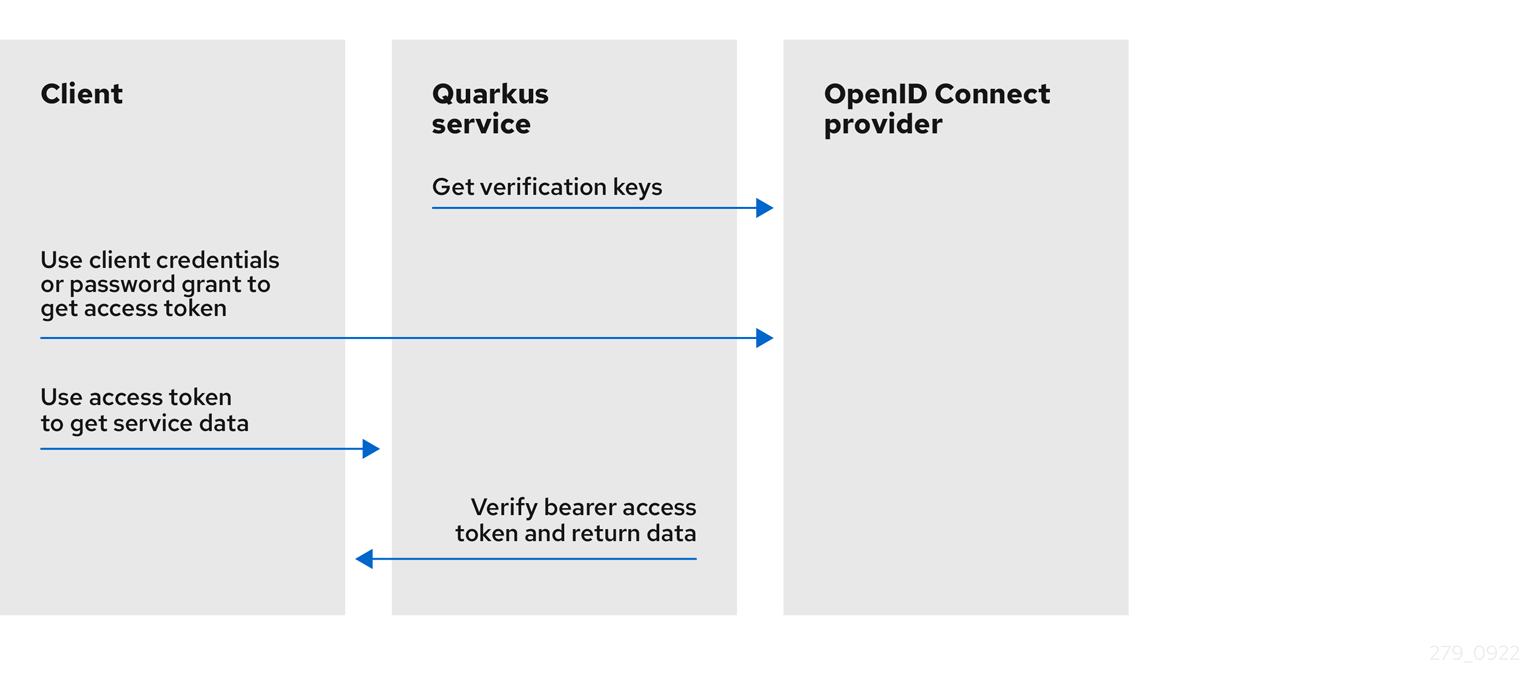
The following diagrams outline the Bearer Token Authorization mechanism in Quarkus:
-
The Quarkus service retrieves verification keys from the OpenID Connect provider. The verification keys are used to verify the bearer access token signatures.
-
The Quarkus user accesses the Single-page application.
-
The Single-page application uses Authorization Code Flow to authenticate the user and retrieve tokens from the OpenID Connect provider.
-
The Single-page application uses the access token to retrieve the service data from the Quarkus service.
-
The Quarkus service verifies the bearer access token signature using the verification keys, checks the token expiry date and other claims, allows the request to proceed if the token is valid, and returns the service response to the Single-page application.
-
The Single-page application returns the same data to the Quarkus user.
-
The Quarkus service retrieves verification keys from the OpenID Connect provider. The verification keys are used to verify the bearer access token signatures.
-
The Client uses
client_credentialsthat requires client ID and secret or password grant, which also requires client ID, secret, user name, and password to retrieve the access token from the OpenID Connect provider. -
The Client uses the access token to retrieve the service data from the Quarkus service.
-
The Quarkus service verifies the bearer access token signature using the verification keys, checks the token expiry date and other claims, allows the request to proceed if the token is valid, and returns the service response to the Client.
If you need to authenticate and authorize the users using OpenID Connect Authorization Code Flow, see Using OpenID Connect to Protect Web Applications. Also, if you use Keycloak and Bearer Tokens, see Using Keycloak to Centralize Authorization.
For information about how to support multiple tenants, see Using OpenID Connect Multi-Tenancy.
快速入门
先决条件
要完成这个指南,你需要:
-
大概15分钟
-
编辑器
-
安装JDK 11以上版本并正确配置了
JAVA_HOME -
Apache Maven 3.8.6
-
A working container runtime (Docker or Podman)
-
如果你愿意的话,还可以选择使用Quarkus CLI
-
如果你想构建原生可执行程序,可以选择安装Mandrel或者GraalVM,并正确配置(或者使用Docker在容器中进行构建)
应用结构
在该例子中,我们建立了一个非常简单的微服务并提供了两个节点:
-
/api/users/me -
/api/admin
这些节点是受保护的,只有当客户端将一个bearer token与请求一起发送时才能被访问,而且该token必须是有效的(例如:签名、过期时间和受众),并且要得到微服务的信任。
不记名令牌是由Keycloak服务器颁发的,并代表令牌发放对象的主体。对于OAuth 2.0授权服务器来说,该令牌还引用了代表用户的客户端。
端点 /api/users/me 可由任何拥有有效令牌的用户访问。作为响应,它返回一个JSON文档,其中包含关于用户的细节,这些细节是从令牌上携带的信息获得的。
端点 /api/admin 受到RBAC(基于角色的访问控制)的保护,只有被授予 admin 角色的用户可以访问。在这个端点,我们使用 @RolesAllowed 注解来声明性地执行访问限制。
解决方案
我们建议您按照下一节的说明逐步创建应用程序。然而,您可以直接转到已完成的示例。
克隆 Git 仓库: git clone https://github.com/quarkusio/quarkus-quickstarts.git ,或下载一个 存档 。
该解决方案位于 security-openid-connect-quickstart 目录中。
创建Maven项目
首先,我们需要一个新的项目。使用以下命令创建一个新的项目:
该命令生成了一个Maven项目,导入了 oidc 扩展,这个扩展是Quarkus的OIDC实现。
如果你已经配置了你的Quarkus项目,你可以通过在你的项目基础目录下运行以下命令,将 oidc 扩展加入到你的项目中去:
quarkus extension add 'oidc'./mvnw quarkus:add-extension -Dextensions='oidc'./gradlew addExtension --extensions='oidc'这将在您的构建文件中添加以下内容:
<dependency>
    <groupId>io.quarkus</groupId>
    <artifactId>quarkus-oidc</artifactId>
</dependency>implementation("io.quarkus:quarkus-oidc")编写应用程序
让我们从实现 /api/users/me 端点开始。从下面的源代码可以看出,它只是一个普通的JAX-RS资源:
package org.acme.security.openid.connect;

import javax.annotation.security.RolesAllowed;
import javax.inject.Inject;
import javax.ws.rs.GET;
import javax.ws.rs.Path;

import org.jboss.resteasy.reactive.NoCache;
import io.quarkus.security.identity.SecurityIdentity;

@Path("/api/users")
public class UsersResource {

    @Inject
    SecurityIdentity securityIdentity;

    @GET
    @Path("/me")
    @RolesAllowed("user")
    @NoCache
    public User me() {
        return new User(securityIdentity);
    }

    public static class User {

        private final String userName;

        User(SecurityIdentity securityIdentity) {
            this.userName = securityIdentity.getPrincipal().getName();
        }

        public String getUserName() {
            return userName;
        }
    }
}
端点 /api/admin 的源代码也非常简单。这里的主要区别是,我们使用 @RolesAllowed 注解来确保只有被授予 admin 角色的用户才能访问该端点:
package org.acme.security.openid.connect;

import javax.annotation.security.RolesAllowed;
import javax.ws.rs.GET;
import javax.ws.rs.Path;
import javax.ws.rs.Produces;
import javax.ws.rs.core.MediaType;

@Path("/api/admin")
public class AdminResource {

    @GET
    @RolesAllowed("admin")
    @Produces(MediaType.TEXT_PLAIN)
    public String admin() {
        return "granted";
    }
}
在 @RequestScoped 和 @ApplicationScoped 的上下文中都支持 SecurityIdentity 注入。
配置该应用程序
OpenID Connect扩展允许您使用 application.properties 来定义适配器配置,该文件应位于 src/main/resources 目录下。
Configuration property fixed at build time - All other configuration properties are overridable at runtime
类型 |
默认 |
|
|---|---|---|
If DevServices has been explicitly enabled or disabled. When DevServices is enabled Quarkus will attempt to automatically configure and start Keycloak when running in Dev or Test mode and when Docker is running. Environment variable: Show more |
boolean |
|
The container image name to use, for container based DevServices providers. Image with a Quarkus based distribution is used by default. Image with a WildFly based distribution can be selected instead, for example: 'quay.io/keycloak/keycloak:19.0.3-legacy'. Note Keycloak Quarkus and Keycloak WildFly images are initialized differently. By default, Dev Services for Keycloak will assume it is a Keycloak Quarkus image if the image version does not end with a '-legacy' string. Set 'quarkus.keycloak.devservices.keycloak-x-image' to override this check. Environment variable: Show more |
string |
|
If Keycloak-X image is used. By default, Dev Services for Keycloak will assume a Keycloak-X image is used if the image name contains a 'keycloak-x' string. Set 'quarkus.keycloak.devservices.keycloak-x-image' to override this check which may be necessary if you build custom Keycloak-X or Keycloak images. You do not need to set this property if the default check works. Environment variable: Show more |
boolean |
|
Indicates if the Keycloak container managed by Quarkus Dev Services is shared. When shared, Quarkus looks for running containers using label-based service discovery. If a matching container is found, it is used, and so a second one is not started. Otherwise, Dev Services for Keycloak starts a new container.
The discovery uses the Environment variable: Show more |
boolean |
|
The value of the Environment variable: Show more |
string |
|
The comma-separated list of class or file system paths to Keycloak realm files which will be used to initialize Keycloak. The first value in this list will be used to initialize default tenant connection properties. Environment variable: Show more |
list of string |
|
The JAVA_OPTS passed to the keycloak JVM Environment variable: Show more |
string |
|
Show Keycloak log messages with a "Keycloak:" prefix. Environment variable: Show more |
boolean |
|
Keycloak start command. Use this property to experiment with Keycloak start options, see Environment variable: Show more |
string |
|
The Keycloak realm name. This property will be used to create the realm if the realm file pointed to by the 'realm-path' property does not exist, default value is 'quarkus' in this case. If the realm file pointed to by the 'realm-path' property exists then it is still recommended to set this property for Dev Services for Keycloak to avoid parsing the realm file in order to determine the realm name. Environment variable: Show more |
string |
|
Indicates if the Keycloak realm has to be created when the realm file pointed to by the 'realm-path' property does not exist. Disable it if you’d like to create a realm using Keycloak Administration Console or Keycloak Admin API from Environment variable: Show more |
boolean |
|
Optional fixed port the dev service will listen to. If not defined, the port will be chosen randomly. Environment variable: Show more |
int |
|
The Keycloak users map containing the username and password pairs. If this map is empty then two users, 'alice' and 'bob' with the passwords matching their names will be created. This property will be used to create the Keycloak users if the realm file pointed to by the 'realm-path' property does not exist. Environment variable: Show more |
|
|
The Keycloak user roles. If this map is empty then a user named 'alice' will get 'admin' and 'user' roles and all other users will get a 'user' role. This property will be used to create the Keycloak roles if the realm file pointed to by the 'realm-path' property does not exist. Environment variable: Show more |
|
|
If the OIDC extension is enabled. Environment variable: Show more |
boolean |
|
Grant type which will be used to acquire a token to test the OIDC 'service' applications Environment variable: Show more |
|
|
The WebClient timeout. Use this property to configure how long an HTTP client used by Dev UI handlers will wait for a response when requesting tokens from OpenId Connect Provider and sending them to the service endpoint. Environment variable: Show more |
|
|
Enable the registration of the Default TokenIntrospection and UserInfo Cache implementation bean. Note it only allows to use the default implementation, one needs to configure it in order to activate it, please see Environment variable: Show more |
boolean |
|
The base URL of the OpenID Connect (OIDC) server, for example, Environment variable: Show more |
string |
|
Enables OIDC discovery. If the discovery is disabled then the OIDC endpoint URLs must be configured individually. Environment variable: Show more |
boolean |
|
Relative path or absolute URL of the OIDC token endpoint which issues access and refresh tokens. Environment variable: Show more |
string |
|
Relative path or absolute URL of the OIDC token revocation endpoint. Environment variable: Show more |
string |
|
The client-id of the application. Each application has a client-id that is used to identify the application Environment variable: Show more |
string |
|
The maximum amount of time connecting to the currently unavailable OIDC server will be attempted for. The number of times the connection request will be repeated is calculated by dividing the value of this property by 2. For example, setting it to Environment variable: Show more |
||
The number of times an attempt to re-establish an already available connection will be repeated for. Note this property is different to the Environment variable: Show more |
int |
|
The amount of time after which the current OIDC connection request will time out. Environment variable: Show more |
|
|
The maximum size of the connection pool used by the WebClient Environment variable: Show more |
int |
|
Client secret which is used for a Environment variable: Show more |
string |
|
The client secret value - it will be ignored if 'secret.key' is set Environment variable: Show more |
string |
|
The CredentialsProvider name which should only be set if more than one CredentialsProvider is registered Environment variable: Show more |
string |
|
The CredentialsProvider client secret key Environment variable: Show more |
string |
|
Authentication method. Environment variable: Show more |
|
|
If provided, indicates that JWT is signed using a secret key Environment variable: Show more |
string |
|
The CredentialsProvider name which should only be set if more than one CredentialsProvider is registered Environment variable: Show more |
string |
|
The CredentialsProvider client secret key Environment variable: Show more |
string |
|
If provided, indicates that JWT is signed using a private key in PEM or JWK format. You can use the Environment variable: Show more |
string |
|
If provided, indicates that JWT is signed using a private key from a key store Environment variable: Show more |
string |
|
A parameter to specify the password of the key store file. If not given, the default ("password") is used. Environment variable: Show more |
string |
|
The private key id/alias Environment variable: Show more |
string |
|
The private key password Environment variable: Show more |
string |
|
JWT audience ('aud') claim value. By default, the audience is set to the address of the OpenId Connect Provider’s token endpoint. Environment variable: Show more |
string |
|
Key identifier of the signing key added as a JWT 'kid' header Environment variable: Show more |
string |
|
Issuer of the signing key added as a JWT 'iss' claim (default: client id) Environment variable: Show more |
string |
|
Subject of the signing key added as a JWT 'sub' claim (default: client id) Environment variable: Show more |
string |
|
Signature algorithm, also used for the Environment variable: Show more |
string |
|
JWT life-span in seconds. It will be added to the time it was issued at to calculate the expiration time. Environment variable: Show more |
int |
|
The host (name or IP address) of the Proxy. Note: If OIDC adapter needs to use a Proxy to talk with OIDC server (Provider), then at least the "host" config item must be configured to enable the usage of a Proxy. Environment variable: Show more |
string |
|
The port number of the Proxy. Default value is 80. Environment variable: Show more |
int |
|
The username, if Proxy needs authentication. Environment variable: Show more |
string |
|
The password, if Proxy needs authentication. Environment variable: Show more |
string |
|
Certificate validation and hostname verification, which can be one of the following values from enum Environment variable: Show more |
|
|
An optional key store which holds the certificate information instead of specifying separate files. Environment variable: Show more |
path |
|
An optional parameter to specify type of the key store file. If not given, the type is automatically detected based on the file name. Environment variable: Show more |
string |
|
An optional parameter to specify a provider of the key store file. If not given, the provider is automatically detected based on the key store file type. Environment variable: Show more |
string |
|
A parameter to specify the password of the key store file. If not given, the default ("password") is used. Environment variable: Show more |
string |
|
An optional parameter to select a specific key in the key store. When SNI is disabled, if the key store contains multiple keys and no alias is specified, the behavior is undefined. Environment variable: Show more |
string |
|
An optional parameter to define the password for the key, in case it’s different from Environment variable: Show more |
string |
|
An optional trust store which holds the certificate information of the certificates to trust Environment variable: Show more |
path |
|
A parameter to specify the password of the trust store file. Environment variable: Show more |
string |
|
A parameter to specify the alias of the trust store certificate. Environment variable: Show more |
string |
|
An optional parameter to specify type of the trust store file. If not given, the type is automatically detected based on the file name. Environment variable: Show more |
string |
|
An optional parameter to specify a provider of the trust store file. If not given, the provider is automatically detected based on the trust store file type. Environment variable: Show more |
string |
|
A unique tenant identifier. It must be set by Environment variable: Show more |
string |
|
If this tenant configuration is enabled. Environment variable: Show more |
boolean |
|
The application type, which can be one of the following values from enum Environment variable: Show more |
|
|
Relative path or absolute URL of the OIDC authorization endpoint which authenticates the users. This property must be set for the 'web-app' applications if OIDC discovery is disabled. This property will be ignored if the discovery is enabled. Environment variable: Show more |
string |
|
Relative path or absolute URL of the OIDC userinfo endpoint. This property must only be set for the 'web-app' applications if OIDC discovery is disabled and 'authentication.user-info-required' property is enabled. This property will be ignored if the discovery is enabled. Environment variable: Show more |
string |
|
Relative path or absolute URL of the OIDC RFC7662 introspection endpoint which can introspect both opaque and JWT tokens. This property must be set if OIDC discovery is disabled and 1) the opaque bearer access tokens have to be verified or 2) JWT tokens have to be verified while the cached JWK verification set with no matching JWK is being refreshed. This property will be ignored if the discovery is enabled. Environment variable: Show more |
string |
|
Relative path or absolute URL of the OIDC JWKS endpoint which returns a JSON Web Key Verification Set. This property should be set if OIDC discovery is disabled and the local JWT verification is required. This property will be ignored if the discovery is enabled. Environment variable: Show more |
string |
|
Relative path or absolute URL of the OIDC end_session_endpoint. This property must be set if OIDC discovery is disabled and RP Initiated Logout support for the 'web-app' applications is required. This property will be ignored if the discovery is enabled. Environment variable: Show more |
string |
|
Public key for the local JWT token verification. OIDC server connection will not be created when this property is set. Environment variable: Show more |
string |
|
Name Environment variable: Show more |
string |
|
Secret Environment variable: Show more |
string |
|
Include OpenId Connect Client ID configured with 'quarkus.oidc.client-id' Environment variable: Show more |
boolean |
|
List of paths to claims containing an array of groups. Each path starts from the top level JWT JSON object and can contain multiple segments where each segment represents a JSON object name only, example: "realm/groups". Use double quotes with the namespace qualified claim names. This property can be used if a token has no 'groups' claim but has the groups set in one or more different claims. Environment variable: Show more |
list of string |
|
Separator for splitting a string which may contain multiple group values. It will only be used if the "role-claim-path" property points to one or more custom claims whose values are strings. A single space will be used by default because the standard 'scope' claim may contain a space separated sequence. Environment variable: Show more |
string |
|
Source of the principal roles. Environment variable: Show more |
|
|
Expected issuer 'iss' claim value. Note this property overrides the Environment variable: Show more |
string |
|
Expected audience 'aud' claim value which may be a string or an array of strings. Environment variable: Show more |
list of string |
|
Expected token type Environment variable: Show more |
string |
|
Life span grace period in seconds. When checking token expiry, current time is allowed to be later than token expiration time by at most the configured number of seconds. When checking token issuance, current time is allowed to be sooner than token issue time by at most the configured number of seconds. Environment variable: Show more |
int |
|
Token age. It allows for the number of seconds to be specified that must not elapse since the Environment variable: Show more |
||
Name of the claim which contains a principal name. By default, the 'upn', 'preferred_username' and Environment variable: Show more |
string |
|
Refresh expired authorization code flow ID or access tokens. If this property is enabled then a refresh token request will be performed if the authorization code ID or access token has expired and, if successful, the local session will be updated with the new set of tokens. Otherwise, the local session will be invalidated and the user redirected to the OpenID Provider to re-authenticate. In this case the user may not be challenged again if the OIDC provider session is still active. For this option be effective the Environment variable: Show more |
boolean |
|
Refresh token time skew in seconds. If this property is enabled then the configured number of seconds is added to the current time when checking if the authorization code ID or access token should be refreshed. If the sum is greater than the authorization code ID or access token’s expiration time then a refresh is going to happen. This property will be ignored if the 'refresh-expired' property is not enabled. Environment variable: Show more |
||
Forced JWK set refresh interval in minutes. Environment variable: Show more |
|
|
Custom HTTP header that contains a bearer token. This option is valid only when the application is of type Environment variable: Show more |
string |
|
Decryption key location. JWT tokens can be inner-signed and encrypted by OpenId Connect providers. However, it is not always possible to remotely introspect such tokens because the providers may not control the private decryption keys. In such cases set this property to point to the file containing the decryption private key in PEM or JSON Web Key (JWK) format. Note that if a 'private_key_jwt' client authentication method is used then the private key which is used to sign client authentication JWT tokens will be used to try to decrypt an encrypted ID token if this property is not set. Environment variable: Show more |
string |
|
Allow the remote introspection of JWT tokens when no matching JWK key is available. Note this property is set to 'true' by default for backward-compatibility reasons and will be set to Environment variable: Show more |
boolean |
|
Require that JWT tokens are only introspected remotely. Environment variable: Show more |
boolean |
|
Allow the remote introspection of the opaque tokens. Set this property to 'false' if only JWT tokens are expected. Environment variable: Show more |
boolean |
|
Indirectly verify that the opaque (binary) access token is valid by using it to request UserInfo. Opaque access token is considered valid if the provider accepted this token and returned a valid UserInfo. You should only enable this option if the opaque access tokens have to be accepted but OpenId Connect provider does not have a token introspection endpoint. This property will have no effect when JWT tokens have to be verified. Environment variable: Show more |
boolean |
|
The relative path of the logout endpoint at the application. If provided, the application is able to initiate the logout through this endpoint in conformance with the OpenID Connect RP-Initiated Logout specification. Environment variable: Show more |
string |
|
Relative path of the application endpoint where the user should be redirected to after logging out from the OpenID Connect Provider. This endpoint URI must be properly registered at the OpenID Connect Provider as a valid redirect URI. Environment variable: Show more |
string |
|
Name of the post logout URI parameter which will be added as a query parameter to the logout redirect URI. Environment variable: Show more |
string |
|
The relative path of the Back-Channel Logout endpoint at the application. Environment variable: Show more |
string |
|
The relative path of the Front-Channel Logout endpoint at the application. Environment variable: Show more |
string |
|
Authorization code flow response mode Environment variable: Show more |
|
|
Relative path for calculating a "redirect_uri" query parameter. It has to start from a forward slash and will be appended to the request URI’s host and port. For example, if the current request URI is 'https://localhost:8080/service' then a 'redirect_uri' parameter will be set to 'https://localhost:8080/' if this property is set to '/' and be the same as the request URI if this property has not been configured. Note the original request URI will be restored after the user has authenticated if 'restorePathAfterRedirect' is set to 'true'. Environment variable: Show more |
string |
|
If this property is set to 'true' then the original request URI which was used before the authentication will be restored after the user has been redirected back to the application. Note if Environment variable: Show more |
boolean |
|
Remove the query parameters such as 'code' and 'state' set by the OIDC server on the redirect URI after the user has authenticated by redirecting a user to the same URI but without the query parameters. Environment variable: Show more |
boolean |
|
Relative path to the public endpoint which will process the error response from the OIDC authorization endpoint. If the user authentication has failed then the OIDC provider will return an 'error' and an optional 'error_description' parameters, instead of the expected authorization 'code'. If this property is set then the user will be redirected to the endpoint which can return a user-friendly error description page. It has to start from a forward slash and will be appended to the request URI’s host and port. For example, if it is set as '/error' and the current request URI is 'https://localhost:8080/callback?error=invalid_scope' then a redirect will be made to 'https://localhost:8080/error?error=invalid_scope'. If this property is not set then HTTP 401 status will be returned in case of the user authentication failure. Environment variable: Show more |
string |
|
Both ID and access tokens are fetched from the OIDC provider as part of the authorization code flow. ID token is always verified on every user request as the primary token which is used to represent the principal and extract the roles. Access token is not verified by default since it is meant to be propagated to the downstream services. The verification of the access token should be enabled if it is injected as a JWT token. Access tokens obtained as part of the code flow will always be verified if Environment variable: Show more |
boolean |
|
Force 'https' as the 'redirect_uri' parameter scheme when running behind an SSL terminating reverse proxy. This property, if enabled, will also affect the logout Environment variable: Show more |
boolean |
|
List of scopes Environment variable: Show more |
list of string |
|
Add the 'openid' scope automatically to the list of scopes. This is required for OpenId Connect providers but will not work for OAuth2 providers such as Twitter OAuth2 which does not accept that scope and throws an error. Environment variable: Show more |
boolean |
|
Request URL query parameters which, if present, will be added to the authentication redirect URI. Environment variable: Show more |
list of string |
|
If enabled the state, session and post logout cookies will have their 'secure' parameter set to 'true' when HTTP is used. It may be necessary when running behind an SSL terminating reverse proxy. The cookies will always be secure if HTTPS is used even if this property is set to false. Environment variable: Show more |
boolean |
|
Cookie name suffix. For example, a session cookie name for the default OIDC tenant is 'q_session' but can be changed to 'q_session_test' if this property is set to 'test'. Environment variable: Show more |
string |
|
Cookie path parameter value which, if set, will be used to set a path parameter for the session, state and post logout cookies. The Environment variable: Show more |
string |
|
Cookie path header parameter value which, if set, identifies the incoming HTTP header whose value will be used to set a path parameter for the session, state and post logout cookies. If the header is missing then the Environment variable: Show more |
string |
|
Cookie domain parameter value which, if set, will be used for the session, state and post logout cookies. Environment variable: Show more |
string |
|
SameSite attribute for the session cookie. Environment variable: Show more |
|
|
If this property is set to 'true' then an OIDC UserInfo endpoint will be called. Environment variable: Show more |
boolean |
|
Session age extension in minutes. The user session age property is set to the value of the ID token life-span by default and the user will be redirected to the OIDC provider to re-authenticate once the session has expired. If this property is set to a non-zero value then the expired ID token can be refreshed before the session has expired. This property will be ignored if the Environment variable: Show more |
|
|
If this property is set to 'true' then a normal 302 redirect response will be returned if the request was initiated via JavaScript API such as XMLHttpRequest or Fetch and the current user needs to be (re)authenticated which may not be desirable for Single Page Applications since it automatically following the redirect may not work given that OIDC authorization endpoints typically do not support CORS. If this property is set to Environment variable: Show more |
boolean |
|
Requires that ID token is available when the authorization code flow completes. Disable this property only when you need to use the authorization code flow with OAuth2 providers which do not return ID token - an internal IdToken will be generated in such cases. Environment variable: Show more |
boolean |
|
Internal ID token lifespan. This property is only checked when an internal IdToken is generated when Oauth2 providers do not return IdToken. Environment variable: Show more |
|
|
Requires that a Proof Key for Code Exchange (PKCE) is used. Environment variable: Show more |
boolean |
|
Secret which will be used to encrypt a Proof Key for Code Exchange (PKCE) code verifier in the code flow state. This secret must be set if PKCE is required but no client secret is set. The length of the secret which will be used to encrypt the code verifier must be 32 characters long. Environment variable: Show more |
string |
|
Default TokenStateManager strategy. Environment variable: Show more |
|
|
Default TokenStateManager keeps all tokens (ID, access and refresh) returned in the authorization code grant response in a single session cookie by default. Enable this property to minimize a session cookie size Environment variable: Show more |
boolean |
|
Requires that the tokens are encrypted before being stored in the cookies. Environment variable: Show more |
boolean |
|
Secret which will be used to encrypt the tokens. This secret must be set if the token encryption is required but no client secret is set. The length of the secret which will be used to encrypt the tokens must be 32 characters long. Environment variable: Show more |
string |
|
Allow caching the token introspection data. Note enabling this property does not enable the cache itself but only permits to cache the token introspection for a given tenant. If the default token cache can be used then please see Environment variable: Show more |
boolean |
|
Allow caching the user info data. Note enabling this property does not enable the cache itself but only permits to cache the user info data for a given tenant. If the default token cache can be used then please see Environment variable: Show more |
boolean |
|
Allow inlining UserInfo in IdToken instead of caching it in the token cache. This property is only checked when an internal IdToken is generated when Oauth2 providers do not return IdToken. Inlining UserInfo in the generated IdToken allows to store it in the session cookie and avoids introducing a cached state. Environment variable: Show more |
boolean |
|
Well known OpenId Connect provider identifier Environment variable: Show more |
|
|
Maximum number of cache entries. Set it to a positive value if the cache has to be enabled. Environment variable: Show more |
int |
|
Maximum amount of time a given cache entry is valid for. Environment variable: Show more |
|
|
Clean up timer interval. If this property is set then a timer will check and remove the stale entries periodically. Environment variable: Show more |
||
Grant options Environment variable: Show more |
|
|
A map of required claims and their expected values. For example, Environment variable: Show more |
|
|
Additional properties which will be added as the query parameters to the logout redirect URI. Environment variable: Show more |
|
|
Additional properties which will be added as the query parameters to the authentication redirect URI. Environment variable: Show more |
|
|
Additional parameters, in addition to the required Environment variable: Show more |
|
|
Custom HTTP headers which have to be sent to complete the authorization code grant request. Environment variable: Show more |
|
|
类型 |
默认 |
|
The base URL of the OpenID Connect (OIDC) server, for example, Environment variable: Show more |
string |
|
Enables OIDC discovery. If the discovery is disabled then the OIDC endpoint URLs must be configured individually. Environment variable: Show more |
boolean |
|
Relative path or absolute URL of the OIDC token endpoint which issues access and refresh tokens. Environment variable: Show more |
string |
|
Relative path or absolute URL of the OIDC token revocation endpoint. Environment variable: Show more |
string |
|
The client-id of the application. Each application has a client-id that is used to identify the application Environment variable: Show more |
string |
|
The maximum amount of time connecting to the currently unavailable OIDC server will be attempted for. The number of times the connection request will be repeated is calculated by dividing the value of this property by 2. For example, setting it to Environment variable: Show more |
||
The number of times an attempt to re-establish an already available connection will be repeated for. Note this property is different to the Environment variable: Show more |
int |
|
The amount of time after which the current OIDC connection request will time out. Environment variable: Show more |
|
|
The maximum size of the connection pool used by the WebClient Environment variable: Show more |
int |
|
Client secret which is used for a Environment variable: Show more |
string |
|
The client secret value - it will be ignored if 'secret.key' is set Environment variable: Show more |
string |
|
The CredentialsProvider name which should only be set if more than one CredentialsProvider is registered Environment variable: Show more |
string |
|
The CredentialsProvider client secret key Environment variable: Show more |
string |
|
Authentication method. Environment variable: Show more |
|
|
If provided, indicates that JWT is signed using a secret key Environment variable: Show more |
string |
|
The CredentialsProvider name which should only be set if more than one CredentialsProvider is registered Environment variable: Show more |
string |
|
The CredentialsProvider client secret key Environment variable: Show more |
string |
|
If provided, indicates that JWT is signed using a private key in PEM or JWK format. You can use the Environment variable: Show more |
string |
|
If provided, indicates that JWT is signed using a private key from a key store Environment variable: Show more |
string |
|
A parameter to specify the password of the key store file. If not given, the default ("password") is used. Environment variable: Show more |
string |
|
The private key id/alias Environment variable: Show more |
string |
|
The private key password Environment variable: Show more |
string |
|
JWT audience ('aud') claim value. By default, the audience is set to the address of the OpenId Connect Provider’s token endpoint. Environment variable: Show more |
string |
|
Key identifier of the signing key added as a JWT 'kid' header Environment variable: Show more |
string |
|
Issuer of the signing key added as a JWT 'iss' claim (default: client id) Environment variable: Show more |
string |
|
Subject of the signing key added as a JWT 'sub' claim (default: client id) Environment variable: Show more |
string |
|
Signature algorithm, also used for the Environment variable: Show more |
string |
|
JWT life-span in seconds. It will be added to the time it was issued at to calculate the expiration time. Environment variable: Show more |
int |
|
The host (name or IP address) of the Proxy. Note: If OIDC adapter needs to use a Proxy to talk with OIDC server (Provider), then at least the "host" config item must be configured to enable the usage of a Proxy. Environment variable: Show more |
string |
|
The port number of the Proxy. Default value is 80. Environment variable: Show more |
int |
|
The username, if Proxy needs authentication. Environment variable: Show more |
string |
|
The password, if Proxy needs authentication. Environment variable: Show more |
string |
|
Certificate validation and hostname verification, which can be one of the following values from enum Environment variable: Show more |
|
|
An optional key store which holds the certificate information instead of specifying separate files. Environment variable: Show more |
path |
|
An optional parameter to specify type of the key store file. If not given, the type is automatically detected based on the file name. Environment variable: Show more |
string |
|
An optional parameter to specify a provider of the key store file. If not given, the provider is automatically detected based on the key store file type. Environment variable: Show more |
string |
|
A parameter to specify the password of the key store file. If not given, the default ("password") is used. Environment variable: Show more |
string |
|
An optional parameter to select a specific key in the key store. When SNI is disabled, if the key store contains multiple keys and no alias is specified, the behavior is undefined. Environment variable: Show more |
string |
|
An optional parameter to define the password for the key, in case it’s different from Environment variable: Show more |
string |
|
An optional trust store which holds the certificate information of the certificates to trust Environment variable: Show more |
path |
|
A parameter to specify the password of the trust store file. Environment variable: Show more |
string |
|
A parameter to specify the alias of the trust store certificate. Environment variable: Show more |
string |
|
An optional parameter to specify type of the trust store file. If not given, the type is automatically detected based on the file name. Environment variable: Show more |
string |
|
An optional parameter to specify a provider of the trust store file. If not given, the provider is automatically detected based on the trust store file type. Environment variable: Show more |
string |
|
A unique tenant identifier. It must be set by Environment variable: Show more |
string |
|
If this tenant configuration is enabled. Environment variable: Show more |
boolean |
|
The application type, which can be one of the following values from enum Environment variable: Show more |
|
|
Relative path or absolute URL of the OIDC authorization endpoint which authenticates the users. This property must be set for the 'web-app' applications if OIDC discovery is disabled. This property will be ignored if the discovery is enabled. Environment variable: Show more |
string |
|
Relative path or absolute URL of the OIDC userinfo endpoint. This property must only be set for the 'web-app' applications if OIDC discovery is disabled and 'authentication.user-info-required' property is enabled. This property will be ignored if the discovery is enabled. Environment variable: Show more |
string |
|
Relative path or absolute URL of the OIDC RFC7662 introspection endpoint which can introspect both opaque and JWT tokens. This property must be set if OIDC discovery is disabled and 1) the opaque bearer access tokens have to be verified or 2) JWT tokens have to be verified while the cached JWK verification set with no matching JWK is being refreshed. This property will be ignored if the discovery is enabled. Environment variable: Show more |
string |
|
Relative path or absolute URL of the OIDC JWKS endpoint which returns a JSON Web Key Verification Set. This property should be set if OIDC discovery is disabled and the local JWT verification is required. This property will be ignored if the discovery is enabled. Environment variable: Show more |
string |
|
Relative path or absolute URL of the OIDC end_session_endpoint. This property must be set if OIDC discovery is disabled and RP Initiated Logout support for the 'web-app' applications is required. This property will be ignored if the discovery is enabled. Environment variable: Show more |
string |
|
Public key for the local JWT token verification. OIDC server connection will not be created when this property is set. Environment variable: Show more |
string |
|
Name Environment variable: Show more |
string |
|
Secret Environment variable: Show more |
string |
|
Include OpenId Connect Client ID configured with 'quarkus.oidc.client-id' Environment variable: Show more |
boolean |
|
List of paths to claims containing an array of groups. Each path starts from the top level JWT JSON object and can contain multiple segments where each segment represents a JSON object name only, example: "realm/groups". Use double quotes with the namespace qualified claim names. This property can be used if a token has no 'groups' claim but has the groups set in one or more different claims. Environment variable: Show more |
list of string |
|
Separator for splitting a string which may contain multiple group values. It will only be used if the "role-claim-path" property points to one or more custom claims whose values are strings. A single space will be used by default because the standard 'scope' claim may contain a space separated sequence. Environment variable: Show more |
string |
|
Source of the principal roles. Environment variable: Show more |
|
|
Expected issuer 'iss' claim value. Note this property overrides the Environment variable: Show more |
string |
|
Expected audience 'aud' claim value which may be a string or an array of strings. Environment variable: Show more |
list of string |
|
A map of required claims and their expected values. For example, Environment variable: Show more |
|
|
Expected token type Environment variable: Show more |
string |
|
Life span grace period in seconds. When checking token expiry, current time is allowed to be later than token expiration time by at most the configured number of seconds. When checking token issuance, current time is allowed to be sooner than token issue time by at most the configured number of seconds. Environment variable: Show more |
int |
|
Token age. It allows for the number of seconds to be specified that must not elapse since the Environment variable: Show more |
||
Name of the claim which contains a principal name. By default, the 'upn', 'preferred_username' and Environment variable: Show more |
string |
|
Refresh expired authorization code flow ID or access tokens. If this property is enabled then a refresh token request will be performed if the authorization code ID or access token has expired and, if successful, the local session will be updated with the new set of tokens. Otherwise, the local session will be invalidated and the user redirected to the OpenID Provider to re-authenticate. In this case the user may not be challenged again if the OIDC provider session is still active. For this option be effective the Environment variable: Show more |
boolean |
|
Refresh token time skew in seconds. If this property is enabled then the configured number of seconds is added to the current time when checking if the authorization code ID or access token should be refreshed. If the sum is greater than the authorization code ID or access token’s expiration time then a refresh is going to happen. This property will be ignored if the 'refresh-expired' property is not enabled. Environment variable: Show more |
||
Forced JWK set refresh interval in minutes. Environment variable: Show more |
|
|
Custom HTTP header that contains a bearer token. This option is valid only when the application is of type Environment variable: Show more |
string |
|
Decryption key location. JWT tokens can be inner-signed and encrypted by OpenId Connect providers. However, it is not always possible to remotely introspect such tokens because the providers may not control the private decryption keys. In such cases set this property to point to the file containing the decryption private key in PEM or JSON Web Key (JWK) format. Note that if a 'private_key_jwt' client authentication method is used then the private key which is used to sign client authentication JWT tokens will be used to try to decrypt an encrypted ID token if this property is not set. Environment variable: Show more |
string |
|
Allow the remote introspection of JWT tokens when no matching JWK key is available. Note this property is set to 'true' by default for backward-compatibility reasons and will be set to Environment variable: Show more |
boolean |
|
Require that JWT tokens are only introspected remotely. Environment variable: Show more |
boolean |
|
Allow the remote introspection of the opaque tokens. Set this property to 'false' if only JWT tokens are expected. Environment variable: Show more |
boolean |
|
Indirectly verify that the opaque (binary) access token is valid by using it to request UserInfo. Opaque access token is considered valid if the provider accepted this token and returned a valid UserInfo. You should only enable this option if the opaque access tokens have to be accepted but OpenId Connect provider does not have a token introspection endpoint. This property will have no effect when JWT tokens have to be verified. Environment variable: Show more |
boolean |
|
The relative path of the logout endpoint at the application. If provided, the application is able to initiate the logout through this endpoint in conformance with the OpenID Connect RP-Initiated Logout specification. Environment variable: Show more |
string |
|
Relative path of the application endpoint where the user should be redirected to after logging out from the OpenID Connect Provider. This endpoint URI must be properly registered at the OpenID Connect Provider as a valid redirect URI. Environment variable: Show more |
string |
|
Name of the post logout URI parameter which will be added as a query parameter to the logout redirect URI. Environment variable: Show more |
string |
|
Additional properties which will be added as the query parameters to the logout redirect URI. Environment variable: Show more |
|
|
The relative path of the Back-Channel Logout endpoint at the application. Environment variable: Show more |
string |
|
The relative path of the Front-Channel Logout endpoint at the application. Environment variable: Show more |
string |
|
Authorization code flow response mode Environment variable: Show more |
|
|
Relative path for calculating a "redirect_uri" query parameter. It has to start from a forward slash and will be appended to the request URI’s host and port. For example, if the current request URI is 'https://localhost:8080/service' then a 'redirect_uri' parameter will be set to 'https://localhost:8080/' if this property is set to '/' and be the same as the request URI if this property has not been configured. Note the original request URI will be restored after the user has authenticated if 'restorePathAfterRedirect' is set to 'true'. Environment variable: Show more |
string |
|
If this property is set to 'true' then the original request URI which was used before the authentication will be restored after the user has been redirected back to the application. Note if Environment variable: Show more |
boolean |
|
Remove the query parameters such as 'code' and 'state' set by the OIDC server on the redirect URI after the user has authenticated by redirecting a user to the same URI but without the query parameters. Environment variable: Show more |
boolean |
|
Relative path to the public endpoint which will process the error response from the OIDC authorization endpoint. If the user authentication has failed then the OIDC provider will return an 'error' and an optional 'error_description' parameters, instead of the expected authorization 'code'. If this property is set then the user will be redirected to the endpoint which can return a user-friendly error description page. It has to start from a forward slash and will be appended to the request URI’s host and port. For example, if it is set as '/error' and the current request URI is 'https://localhost:8080/callback?error=invalid_scope' then a redirect will be made to 'https://localhost:8080/error?error=invalid_scope'. If this property is not set then HTTP 401 status will be returned in case of the user authentication failure. Environment variable: Show more |
string |
|
Both ID and access tokens are fetched from the OIDC provider as part of the authorization code flow. ID token is always verified on every user request as the primary token which is used to represent the principal and extract the roles. Access token is not verified by default since it is meant to be propagated to the downstream services. The verification of the access token should be enabled if it is injected as a JWT token. Access tokens obtained as part of the code flow will always be verified if Environment variable: Show more |
boolean |
|
Force 'https' as the 'redirect_uri' parameter scheme when running behind an SSL terminating reverse proxy. This property, if enabled, will also affect the logout Environment variable: Show more |
boolean |
|
List of scopes Environment variable: Show more |
list of string |
|
Add the 'openid' scope automatically to the list of scopes. This is required for OpenId Connect providers but will not work for OAuth2 providers such as Twitter OAuth2 which does not accept that scope and throws an error. Environment variable: Show more |
boolean |
|
Additional properties which will be added as the query parameters to the authentication redirect URI. Environment variable: Show more |
|
|
Request URL query parameters which, if present, will be added to the authentication redirect URI. Environment variable: Show more |
list of string |
|
If enabled the state, session and post logout cookies will have their 'secure' parameter set to 'true' when HTTP is used. It may be necessary when running behind an SSL terminating reverse proxy. The cookies will always be secure if HTTPS is used even if this property is set to false. Environment variable: Show more |
boolean |
|
Cookie name suffix. For example, a session cookie name for the default OIDC tenant is 'q_session' but can be changed to 'q_session_test' if this property is set to 'test'. Environment variable: Show more |
string |
|
Cookie path parameter value which, if set, will be used to set a path parameter for the session, state and post logout cookies. The Environment variable: Show more |
string |
|
Cookie path header parameter value which, if set, identifies the incoming HTTP header whose value will be used to set a path parameter for the session, state and post logout cookies. If the header is missing then the Environment variable: Show more |
string |
|
Cookie domain parameter value which, if set, will be used for the session, state and post logout cookies. Environment variable: Show more |
string |
|
SameSite attribute for the session cookie. Environment variable: Show more |
|
|
If this property is set to 'true' then an OIDC UserInfo endpoint will be called. Environment variable: Show more |
boolean |
|
Session age extension in minutes. The user session age property is set to the value of the ID token life-span by default and the user will be redirected to the OIDC provider to re-authenticate once the session has expired. If this property is set to a non-zero value then the expired ID token can be refreshed before the session has expired. This property will be ignored if the Environment variable: Show more |
|
|
If this property is set to 'true' then a normal 302 redirect response will be returned if the request was initiated via JavaScript API such as XMLHttpRequest or Fetch and the current user needs to be (re)authenticated which may not be desirable for Single Page Applications since it automatically following the redirect may not work given that OIDC authorization endpoints typically do not support CORS. If this property is set to Environment variable: Show more |
boolean |
|
Requires that ID token is available when the authorization code flow completes. Disable this property only when you need to use the authorization code flow with OAuth2 providers which do not return ID token - an internal IdToken will be generated in such cases. Environment variable: Show more |
boolean |
|
Internal ID token lifespan. This property is only checked when an internal IdToken is generated when Oauth2 providers do not return IdToken. Environment variable: Show more |
|
|
Requires that a Proof Key for Code Exchange (PKCE) is used. Environment variable: Show more |
boolean |
|
Secret which will be used to encrypt a Proof Key for Code Exchange (PKCE) code verifier in the code flow state. This secret must be set if PKCE is required but no client secret is set. The length of the secret which will be used to encrypt the code verifier must be 32 characters long. Environment variable: Show more |
string |
|
Additional parameters, in addition to the required Environment variable: Show more |
|
|
Custom HTTP headers which have to be sent to complete the authorization code grant request. Environment variable: Show more |
|
|
Default TokenStateManager strategy. Environment variable: Show more |
|
|
Default TokenStateManager keeps all tokens (ID, access and refresh) returned in the authorization code grant response in a single session cookie by default. Enable this property to minimize a session cookie size Environment variable: Show more |
boolean |
|
Requires that the tokens are encrypted before being stored in the cookies. Environment variable: Show more |
boolean |
|
Secret which will be used to encrypt the tokens. This secret must be set if the token encryption is required but no client secret is set. The length of the secret which will be used to encrypt the tokens must be 32 characters long. Environment variable: Show more |
string |
|
Allow caching the token introspection data. Note enabling this property does not enable the cache itself but only permits to cache the token introspection for a given tenant. If the default token cache can be used then please see Environment variable: Show more |
boolean |
|
Allow caching the user info data. Note enabling this property does not enable the cache itself but only permits to cache the user info data for a given tenant. If the default token cache can be used then please see Environment variable: Show more |
boolean |
|
Allow inlining UserInfo in IdToken instead of caching it in the token cache. This property is only checked when an internal IdToken is generated when Oauth2 providers do not return IdToken. Inlining UserInfo in the generated IdToken allows to store it in the session cookie and avoids introducing a cached state. Environment variable: Show more |
boolean |
|
Well known OpenId Connect provider identifier Environment variable: Show more |
|
|
About the Duration format
持续时间的格式使用标准的 您还可以提供以数字开头的持续时间值。 在这种情况下,如果该值仅包含一个数字,则转换器将该值视为秒。 否则, |
配置示例:
%prod.quarkus.oidc.auth-server-url=http://localhost:8180/realms/quarkus
quarkus.oidc.client-id=backend-service
quarkus.oidc.credentials.secret=secret

# Tell Dev Services for Keycloak to import the realm file
# This property is not effective when running the application in JVM or Native modes

quarkus.keycloak.devservices.realm-path=quarkus-realm.json
在 quarkus.oidc.auth-server-url 上添加一个 %prod. profile前缀,可以确保 Keycloak开发服务 在应用程序以开发模式运行时为您启动一个容器。更多信息请参见下面的 " 在开发模式下运行应用程序 "部分。
|
启动和配置Keycloak服务器
当你以开发模式运行应用程序时,不要启动Keycloak服务器 - Keycloak开发模式 将启动一个容器。更多信息请参见下面在 在keycloak开发模式下运行应用程序 的部分。确保把https://github.com/quarkusio/quarkus-quickstarts/tree/2.16/security-openid-connect-quickstart/config/quarkus-realm.json[境界配置文件]放在classpath( target/classes 目录)上,以便在开发模式下运行时自动导入—除非你已经构建了https://github.com/quarkusio/quarkus-quickstarts/tree/2.16/security-openid-connect-quickstart[完整解决方案],这样的话,这个领域文件会在构建时被加入classpath。
|
要启动Keycloak服务器,您可以使用Docker服务,且只需运行以下命令:
docker run --name keycloak -e KEYCLOAK_ADMIN=admin -e KEYCLOAK_ADMIN_PASSWORD=admin -p 8180:8080 quay.io/keycloak/keycloak:{keycloak.version} start-dev其中 keycloak.version 应该设置为 17.0.0 或更高。
你应该能够通过 localhost:8180 访问你的Keycloak服务器。
以 admin 用户身份登录,访问Keycloak管理控制台。用户名应该是 admin ,密码是 admin 。
If you want to use the Keycloak Admin Client to configure your server from your application you need to include the
either quarkus-keycloak-admin-client or the quarkus-keycloak-admin-client-reactive (if the application uses quarkus-rest-client-reactive) extension.
See the Quarkus Keycloak Admin Client guide for more information.
|
在开发模式下运行应用程序
要在开发模式下运行应用程序,请使用:
quarkus dev./mvnw quarkus:dev./gradlew --console=plain quarkusDevKeycloak开发服务 将启动一个Keycloak容器并导入一个 quarkus-realm.json 。
您将被要求登录到由 OpenID Connect Dev UI 提供的 Single Page Application :
-
以
alice(密码:alice)的身份登录,他的角色(role)是user-
访问
/api/admin,将返回403 -
访问
/api/users/me,将返回200
-
-
退出并以
admin(密码:admin)的身份登录,他同时拥有admin和user的角色(roles)-
访问
/api/admin,将返回200 -
访问
/api/users/me,将返回200
-
在JVM模式下运行应用程序
当您尝试完毕 开发 模式后,您可以把它作为一个标准的Java应用程序运行。
首先编译它:
quarkus build./mvnw install./gradlew build然后运行:
java -jar target/quarkus-app/quarkus-run.jar在本地模式下运行应用程序
这个同样的演示可以被编译成本地代码:不需要任何修改。
这意味着您不再需要在您的生产环境中安装JVM,因为运行时技术包含在生产的二进制文件中,并以最小的资源开销优化运行。
编译会花一点时间,所以这一步默认是禁用的;让我们通过启用 native profile来再次构建:
quarkus build --native./mvnw install -Dnative./gradlew build -Dquarkus.package.type=native一杯咖啡的时间后,您就可以直接运行该二进制文件了:
./target/security-openid-connect-quickstart-1.0.0-SNAPSHOT-runner测试应用程序
关于在开发模式下测试您的应用程序,请参见上面 在开发模式下运行应用程序 一节。
您可以用 curl 测试在JVM或Native模式下启动的应用程序。
该应用程序使用bearer token授权,首先要做的是从Keycloak服务器获得一个访问token,以便访问应用程序资源:
export access_token=$(\
    curl --insecure -X POST http://localhost:8180/realms/quarkus/protocol/openid-connect/token \
    --user backend-service:secret \
    -H 'content-type: application/x-www-form-urlencoded' \
    -d 'username=alice&password=alice&grant_type=password' | jq --raw-output '.access_token' \
 )
上面的命令为用户 alice 获取了一个访问token。
任何用户都被允许访问 <a href="http://localhost:8080/api/users/me" class="bare">http://localhost:8080/api/users/me</a>; 节点,该节点会返回一个包含用户详细信息的JSON payload。
curl -v -X GET \
  http://localhost:8080/api/users/me \
  -H "Authorization: Bearer "$access_token
该 http://localhost:8080/api/admin 端点只能由具有 admin 角色的用户访问。如果你试图用先前发布的访问令牌访问这个端点,你应该会从服务器上得到一个 403 的响应。
curl -v -X GET \
   http://localhost:8080/api/admin \
   -H "Authorization: Bearer "$access_token
为了访问管理节点,您需要获得一个 admin 用户的token:
export access_token=$(\
    curl --insecure -X POST http://localhost:8180/realms/quarkus/protocol/openid-connect/token \
    --user backend-service:secret \
    -H 'content-type: application/x-www-form-urlencoded' \
    -d 'username=admin&password=admin&grant_type=password' | jq --raw-output '.access_token' \
 )
关于编写依赖 Keycloak开发服务 的集成测试,也请参见下面的 Keycloak开发服务 部分。
参考指南
访问JWT声明
如果你需要访问JWT令牌声明,那么你要注入 JsonWebToken :
package org.acme.security.openid.connect;

import org.eclipse.microprofile.jwt.JsonWebToken;
import javax.inject.Inject;
import javax.annotation.security.RolesAllowed;
import javax.ws.rs.GET;
import javax.ws.rs.Path;
import javax.ws.rs.Produces;
import javax.ws.rs.core.MediaType;

@Path("/api/admin")
public class AdminResource {

    @Inject
    JsonWebToken jwt;

    @GET
    @RolesAllowed("admin")
    @Produces(MediaType.TEXT_PLAIN)
    public String admin() {
        return "Access for subject " + jwt.getSubject() + " is granted";
    }
}
在 @ApplicationScoped , @Singleton 和 @RequestScoped 范围上下文中支持注入 JsonWebToken ,但是如果单个声明被注入为简单类型,则需要使用 @RequestScoped ,更多细节请参见 JsonWebToken和声明所支持注入范围(Injection Scopes) 。
用户信息
如果要从OIDC userinfo端点请求UserInfo JSON对象,那么要设置 quarkus.oidc.authentication.user-info-required=true 。一个请求将被发送到OpenID Provider UserInfo端点,并将创建一个 io.quarkus.oidc.UserInfo (一个简单的 javax.json.JsonObject 包装器)对象。 io.quarkus.oidc.UserInfo 可以被注入或作为SecurityIdentity userinfo 属性访问。
配置元数据
当前租户发现的 OpenID Connect配置元数据 由 io.quarkus.oidc.OidcConfigurationMetadata 表示,可以作为 SecurityIdentity configuration-metadata 属性注入或访问。
如果端点是公开的,则默认租户的 OidcConfigurationMetadata 会被注入。
令牌声明(Token Claims)和安全身份角色(SecurityIdentity Roles)
安全身份(SecurityIdentity)角色可以从经过验证的JWT访问令牌中映射出来,具体如下:
-
如果
quarkus.oidc.roles.role-claim-path属性被设置,并且找到匹配的数组或字符串声明,那么角色将从这些声明中提取。例如,customroles,customroles/array,scope,"http://namespace-qualified-custom-claim"/roles,"http://namespace-qualified-roles", 等等。 -
如果存在
groups声明,则这个声明的值会被使用 -
如果
realm_access/roles或resource_access/client_id/roles(其中client_id是quarkus.oidc.client-id属性的值)声明是存在的,那么它的值会被使用。该检查支持由Keycloak发行的令牌
如果令牌是不透明的(二进制),那么将使用来自远程令牌自省(token introspection)响应的 scope 属性。
如果使用UserInfo为角色的来源,那么要设置 quarkus.oidc.authentication.user-info-required=true 和 quarkus.oidc.roles.source=userinfo ,如果需要的话,设置 quarkus.oidc.roles.role-claim-path 。
Additionally, a custom SecurityIdentityAugmentor can also be used to add the roles as documented here.
代币验证(Token Verification)和自省(Introspection)
如果令牌是 JWT 令牌,则默认情况下,将使用从 OpenID Connect 提供程序的 JWK 端点检索到的本地 JsonWebKeySet 中的 JsonWebKey(JWK) 密钥对其进行验证。令牌的密钥标识符 kid 标头值( header value)将用于查找匹配的 JWK 密钥。 如果本地没有匹配的 JWK 可用,则 JsonWebKeySet 将通过从JWK端点获取当前密钥集来刷新。JsonWebKeySet 刷新只能在 quarkus.oidc.token.forced-jwk-refresh-interval(默认值为10分钟)过期后重复。 如果在刷新后没有匹配的“JWK”可用,则 JWT 令牌将发送到 OpenID Connect 提供程序的令牌自检终结点。
如果令牌是不透明的(可以是二进制令牌或加密的JWT令牌),那么它将总是被发送到OpenID Connect提供者的令牌自省端点。
如果你只使用JWT令牌,并且期望一个匹配的 JsonWebKey ,那么你应该禁用令牌自省:
quarkus.oidc.token.allow-jwt-introspection=false
quarkus.oidc.token.allow-opaque-token-introspection=false
然而,在某些情况下,JWT令牌必须只通过自省来验证。它可以通过配置一个自省端点地址来强制进行,例如,在Keycloak的情况下,你可以这样做:
quarkus.oidc.auth-server-url=http://localhost:8180/realms/quarkus
quarkus.oidc.discovery-enabled=false
# Token Introspection endpoint: http://localhost:8180/realms/quarkus/protocol/openid-connect/tokens/introspect
quarkus.oidc.introspection-path=/protocol/openid-connect/tokens/introspect
An advantage of this indirect enforcement of JWT tokens being only introspected remotely is that two remote call are avoided: a remote OIDC metadata discovery call followed by another remote call fetching the verification keys which will not be used, while its disavantage is that the users need to know the introspection endpoint address and configure it manually.
The alternative approach is to allow discovering the OIDC metadata (which is a default option) but require that only the remote JWT introspection is performed:
quarkus.oidc.auth-server-url=http://localhost:8180/realms/quarkus
quarkus.oidc.token.require-jwt-introspection-only=true
An advantage of this approach is that the configuration is simple and easy to understand, while its disavantage is that a remote OIDC metadata discovery call is required to discover an introspection endpoint address (though the verification keys will also not be fetched).
请注意, io.quarkus.oidc.TokenIntrospection (一个简单的 javax.json.JsonObject 包装器)对象将被创建,如果JWT或不透明令牌已被成功自省,可以被注入或作为SecurityIdentity introspection 属性访问。
Token Introspection and UserInfo Cache
所有不透明的、有时是JWT不记名的访问令牌都必须进行远程自省。如果还需要 UserInfo ,那么相同的访问令牌将被用来再次远程调用OpenID Connect Provider。因此,如果需要 UserInfo ,并且当前的访问令牌是不透明的,那么对于每一个这样的令牌,将进行两次远程调用—一次是反省,一次是用它来获取UserInfo,如果令牌是JWT,那么通常只需要一次远程调用—用它来获取UserInfo。
每一个传入的不记名流(bearer flow)或授权码流(code flow)访问令牌要进行多达2次的远程呼叫,其开销有时会是个问题。
如果在你的生产中有这种情况,那么可以建议将令牌自省和 UserInfo 数据缓存一小段时间,例如,3或5分钟。
quarkus-oidc 提供 quarkus.oidc.TokenIntrospectionCache 和 quarkus.oidc.UserInfoCache 接口,可用于实现 @ApplicationScoped 缓存实现,可用于存储和检索 quarkus.oidc.TokenIntrospection 和/或 quarkus.oidc.UserInfo 对象,例如:
@ApplicationScoped
@AlternativePriority(1)
public class CustomIntrospectionUserInfoCache implements TokenIntrospectionCache, UserInfoCache {
...
}
每个OIDC租户可以允许或拒绝存储其 quarkus.oidc.TokenIntrospection 和/或 quarkus.oidc.UserInfo 数据,其属性为布尔值 quarkus.oidc."tenant".allow-token-introspection-cache 和 quarkus.oidc."tenant".allow-user-info-cache 。
此外, quarkus-oidc 提供了一个简单的基于内存的默认令牌缓存,该缓存同时实现了 quarkus.oidc.TokenIntrospectionCache 和 quarkus.oidc.UserInfoCache 接口。
它可以按以下方式激活和配置:
# 'max-size' is 0 by default so the cache can be activated by setting 'max-size' to a positive value.
quarkus.oidc.token-cache.max-size=1000
# 'time-to-live' specifies how long a cache entry can be valid for and will be used by a cleanup timer.
quarkus.oidc.token-cache.time-to-live=3M
# 'clean-up-timer-interval' is not set by default so the cleanup timer can be activated by setting 'clean-up-timer-interval'.
quarkus.oidc.token-cache.clean-up-timer-interval=1M
默认的缓存使用一个令牌作为密钥,每个条目可以有 TokenIntrospection 和/或 UserInfo 。它只保留最多数量的条目 max-size 。如果要添加一个新的条目时,缓存已经满了,那么将试图通过删除一个过期的条目来为它找到一个空间。此外,清理计时器,如果被激活,将定期检查过期的条目并将其删除。
请尝试使用默认的缓存实现或注册一个自定义的缓存。
JSON Web Token Claim Verification
一旦无记名JWT令牌的签名被验证,其 expires at ( exp )声明会被检查,接下来也会验证 iss ( issuer )声明的值。
默认情况下, iss 声明的值会与 issuer 属性进行比较,该属性有可能会在众所周知的提供者配置中找到。但是,如果 quarkus.oidc.token.issuer 属性被设置,那么 iss 声明的值将与它进行比较。
在某些情况下,这种 iss 声明验证可能不起作用。例如,如果发现的 issuer 属性包含一个内部 HTTP/IP地址,而令牌 iss 声明值包含一个外部 HTTP/IP地址。或者当发现的 issuer 属性包含模板租户变量,但令牌 iss 声明值有完整的租户特定发行人(tenant-specific issuer )的值。
在这种情况下,你可能要考虑通过设置 quarkus.oidc.token.issuer=any ,来跳过发行人验证。请注意,不建议这样做,除非没有其他选择,否则应避免这样做:
-
如果你使用Keycloak,并观察到由于不同的主机地址导致发行人验证错误,那么用
KEYCLOAK_FRONTEND_URL属性配置Keycloak,以确保使用相同的主机地址。 -
如果在多租户部署中,
iss属性是租户特定的,那么你可以使用SecurityIdentitytenant-id属性来检查端点本身或自定义 JAX-RS 过滤器中的签发者是否正确,例如:
import javax.inject.Inject;
import javax.ws.rs.container.ContainerRequestContext;
import javax.ws.rs.container.ContainerRequestFilter;
import javax.ws.rs.ext.Provider;

import org.eclipse.microprofile.jwt.JsonWebToken;
import io.quarkus.oidc.OidcConfigurationMetadata;
import io.quarkus.security.identity.SecurityIdentity;

@Provider
public class IssuerValidator implements ContainerRequestFilter {
    @Inject
    OidcConfigurationMetadata configMetadata;

    @Inject JsonWebToken jwt;
    @Inject SecurityIdentity identity;

    public void filter(ContainerRequestContext requestContext) {
        String issuer = configMetadata.getIssuer().replace("{tenant-id}", identity.getAttribute("tenant-id"));
        if (!issuer.equals(jwt.getIssuer())) {
            requestContext.abortWith(Response.status(401).build());
        }
    }
}
注意,建议使用 quarkus.oidc.token.audience 属性来验证令牌 aud ( audience )声明的值。
单页应用程序
单页应用程序(SPA)通常使用 XMLHttpRequest (XHR)和OpenID Connect提供商提供的Java Script实用程序代码来获取不记名令牌,并使用它来访问Quarkus service 应用程序。
例如,以下是你如何使用 keycloak.js 来验证用户并从SPA中刷新过期的令牌:
<html>
<head>
    <title>keycloak-spa</title>
    <script src="https://cdn.jsdelivr.net/npm/axios/dist/axios.min.js"></script>
    <script src="http://localhost:8180/js/keycloak.js"></script>
    <script>
        var keycloak = new Keycloak();
        keycloak.init({onLoad: 'login-required'}).success(function () {
            console.log('User is now authenticated.');
        }).error(function () {
            window.location.reload();
        });
        function makeAjaxRequest() {
            axios.get("/api/hello", {
                headers: {
                    'Authorization': 'Bearer ' + keycloak.token
                }
            })
            .then( function (response) {
                console.log("Response: ", response.status);
            }).catch(function (error) {
                console.log('refreshing');
                keycloak.updateToken(5).then(function () {
                    console.log('Token refreshed');
                }).catch(function () {
                    console.log('Failed to refresh token');
                    window.location.reload();
                });
            });
    }
    </script>
</head>
<body>
    <button onclick="makeAjaxRequest()">Request</button>
</body>
</html>
跨域资源共享(CORS)
如果你打算从运行在不同域的单页应用中使用你的OpenID Connect service 应用程序,你将需要配置CORS(跨源资源共享)。请阅读 HTTP CORS文档 以了解更多细节。
提供者端点配置
OIDC service 应用程序需要知道OpenID Connect提供者的令牌、 JsonWebKey (JWK)集以及可能的 UserInfo 和自省端点地址。
默认情况下,它们是通过在配置的 quarkus.oidc.auth-server-url 中,添加一个 /.well-known/openid-configuration 路径来发现的。
另外,如果发现端点不可用,或者你想节省发现端点的往返开销,你可以禁用发现,用相对路径值配置它们,比如说:
quarkus.oidc.auth-server-url=http://localhost:8180/realms/quarkus
quarkus.oidc.discovery-enabled=false
# Token endpoint: http://localhost:8180/realms/quarkus/protocol/openid-connect/token
quarkus.oidc.token-path=/protocol/openid-connect/token
# JWK set endpoint: http://localhost:8180/realms/quarkus/protocol/openid-connect/certs
quarkus.oidc.jwks-path=/protocol/openid-connect/certs
# UserInfo endpoint: http://localhost:8180/realms/quarkus/protocol/openid-connect/userinfo
quarkus.oidc.user-info-path=/protocol/openid-connect/userinfo
# Token Introspection endpoint: http://localhost:8180/realms/quarkus/protocol/openid-connect/tokens/introspect
quarkus.oidc.introspection-path=/protocol/openid-connect/tokens/introspect
令牌传播
关于承载访问令牌向下游服务的传播,请参见 令牌 传播部分。
Oidc Provider Client Authentication
属性 quarkus.oidc.runtime.OidcProviderClient 是在需要对OpenID连接提供者进行远程请求时使用的。如果必须对不记名令牌进行检查,那么 ,必须对OpenID Connect Provider进行认证。请参阅 OidcProviderClient OidcProviderClient 认证 以了解更多关于所支持认证选项的信息。
测试
首先在你的测试项目中添加以下依赖项:
<dependency>
    <groupId>io.rest-assured</groupId>
    <artifactId>rest-assured</artifactId>
    <scope>test</scope>
</dependency>
<dependency>
    <groupId>io.quarkus</groupId>
    <artifactId>quarkus-junit5</artifactId>
    <scope>test</scope>
</dependency>testImplementation("io.rest-assured:rest-assured")
testImplementation("io.quarkus:quarkus-junit5")Wiremock
在你的测试项目中添加以下依赖项:
<dependency>
    <groupId>io.quarkus</groupId>
    <artifactId>quarkus-test-oidc-server</artifactId>
    <scope>test</scope>
</dependency>testImplementation("io.quarkus:quarkus-test-oidc-server")准备好REST测试端点,设置 application.properties ,例如:
# keycloak.url is set by OidcWiremockTestResource
quarkus.oidc.auth-server-url=${keycloak.url}/realms/quarkus/
quarkus.oidc.client-id=quarkus-service-app
quarkus.oidc.application-type=service
并最终写出测试代码,例如:
import static org.hamcrest.Matchers.equalTo;

import java.util.Set;

import org.junit.jupiter.api.Test;

import io.quarkus.test.common.QuarkusTestResource;
import io.quarkus.test.junit.QuarkusTest;
import io.quarkus.test.oidc.server.OidcWiremockTestResource;
import io.restassured.RestAssured;
import io.smallrye.jwt.build.Jwt;

@QuarkusTest
@QuarkusTestResource(OidcWiremockTestResource.class)
public class BearerTokenAuthorizationTest {

    @Test
    public void testBearerToken() {
        RestAssured.given().auth().oauth2(getAccessToken("alice", Set.of("user")))
            .when().get("/api/users/me")
            .then()
            .statusCode(200)
            // the test endpoint returns the name extracted from the injected SecurityIdentity Principal
            .body("userName", equalTo("alice"));
    }

    private String getAccessToken(String userName, Set<String> groups) {
        return Jwt.preferredUserName(userName)
                .groups(groups)
                .issuer("https://server.example.com")
                .audience("https://service.example.com")
                .sign();
    }
}
请注意, quarkus-test-oidc-server 扩展包括一个 JSON Web Key ( JWK ) 格式的签名 RSA 私钥文件,并通过 smallrye.jwt.sign.key.location 配置属性指向它。它允许使用一个无参数的 sign() 操作来签署令牌。
用 OidcWiremockTestResource 测试你的 quarkus-oidc service 应用程序,可以提供最好的覆盖率,因为即使是通信通道也是针对Wiremock HTTP存根(stubs) 进行测试的。 OidcWiremockTestResource 将在未来得到加强,以支持更复杂的不记名令牌测试场景。
如果一个测试需要立即定义Wiremock存根(stubs),而目前 OidcWiremockTestResource 不支持,可以通过注入测试类的 WireMockServer 实例来实现,例如:
|
|
package io.quarkus.it.keycloak;

import static com.github.tomakehurst.wiremock.client.WireMock.matching;
import static org.hamcrest.Matchers.equalTo;

import org.junit.jupiter.api.Test;

import com.github.tomakehurst.wiremock.WireMockServer;
import com.github.tomakehurst.wiremock.client.WireMock;

import io.quarkus.test.junit.QuarkusTest;
import io.quarkus.test.oidc.server.OidcWireMock;
import io.restassured.RestAssured;

@QuarkusTest
public class CustomOidcWireMockStubTest {

    @OidcWireMock
    WireMockServer wireMockServer;

    @Test
    public void testInvalidBearerToken() {
        wireMockServer.stubFor(WireMock.post("/auth/realms/quarkus/protocol/openid-connect/token/introspect")
                .withRequestBody(matching(".*token=invalid_token.*"))
                .willReturn(WireMock.aResponse().withStatus(400)));

        RestAssured.given().auth().oauth2("invalid_token").when()
                .get("/api/users/me/bearer")
                .then()
                .statusCode(401)
                .header("WWW-Authenticate", equalTo("Bearer"));
    }
}
为Keycloak提供的开发服务
建议使用 Keycloak开发服务 进行针对Keycloak的集成测试。 Keycloak开发服务 将启动和初始化一个测试容器:它将创建一个 quarkus 领域,一个 quarkus-app 客户端( secret 秘密)并添加 alice ( admin 和 user 角色)和 bob ( user 角色)用户,其中所有这些属性都可以被定制。
首先,你需要添加以下依赖关系:
<dependency>
    <groupId>io.quarkus</groupId>
    <artifactId>quarkus-test-keycloak-server</artifactId>
    <scope>test</scope>
</dependency>testImplementation("io.quarkus:quarkus-test-keycloak-server")其中提供了一个实用类 io.quarkus.test.keycloak.client.KeycloakTestClient ,你可以在测试中使用它来获取访问令牌。
接下来准备你的 application.properties 。你可以从一个完全空的 application.properties 开始,因为 Keycloak开发服务 将注册指向运行中的测试容器的 quarkus.oidc.auth-server-url ,以及 quarkus.oidc.client-id=quarkus-app 和 quarkus.oidc.credentials.secret=secret 。
但是如果你已经配置了所需的 quarkus-oidc 属性,那么你只需要将 quarkus.oidc.auth-server-url 与 Keycloak开发服务 的 prod 配置文件联系起来,以启动一个容器,例如:
%prod.quarkus.oidc.auth-server-url=http://localhost:8180/realms/quarkus如果在运行测试前必须将自定义领域文件导入Keycloak,那么你可以按以下方式配置 Keycloak开发服务 :
%prod.quarkus.oidc.auth-server-url=http://localhost:8180/realms/quarkus
quarkus.keycloak.devservices.realm-path=quarkus-realm.json
最后编写你的测试,它将在JVM模式下执行:
package org.acme.security.openid.connect;

import io.quarkus.test.junit.QuarkusTest;
import io.quarkus.test.keycloak.client.KeycloakTestClient;
import io.restassured.RestAssured;
import org.junit.jupiter.api.Test;

@QuarkusTest
public class BearerTokenAuthenticationTest {

    KeycloakTestClient keycloakClient = new KeycloakTestClient();

    @Test
    public void testAdminAccess() {
        RestAssured.given().auth().oauth2(getAccessToken("alice"))
                .when().get("/api/admin")
                .then()
                .statusCode(200);
        RestAssured.given().auth().oauth2(getAccessToken("bob"))
                .when().get("/api/admin")
                .then()
                .statusCode(403);
    }

    protected String getAccessToken(String userName) {
        return keycloakClient.getAccessToken(userName);
    }
}
在原生模式(native mode)下:
package org.acme.security.openid.connect;

import io.quarkus.test.junit.QuarkusIntegrationTest;

@QuarkusIntegrationTest
public class NativeBearerTokenAuthenticationIT extends BearerTokenAuthenticationTest {
}
请参阅 Keycloak开发服务 ,来了解更多关于它的初始化和配置方式的信息。
KeycloakTestResourceLifecycleManager
如果你需要对Keycloak做一些集成测试,那么我们鼓励你使用 Keycloak开发服务 来做。只有在有充分理由不使用 Keycloak开发服务 的情况下,才使用 KeycloakTestResourceLifecycleManager 进行测试。
首先要添加以下依赖关系:
<dependency>
    <groupId>io.quarkus</groupId>
    <artifactId>quarkus-test-keycloak-server</artifactId>
    <scope>test</scope>
</dependency>testImplementation("io.quarkus:quarkus-test-keycloak-server")它提供了 io.quarkus.test.keycloak.server.KeycloakTestResourceLifecycleManager - 一个 io.quarkus.test.common.QuarkusTestResourceLifecycleManager 的实现,用来启动一个Keycloak容器。
并按以下方式配置Maven Surefire插件:
<plugin>
    <artifactId>maven-surefire-plugin</artifactId>
    <configuration>
        <systemPropertyVariables>
            <!-- or, alternatively, configure 'keycloak.version' -->
            <keycloak.docker.image>${keycloak.docker.image}</keycloak.docker.image>
            <!--
              Disable HTTPS if required:
              <keycloak.use.https>false</keycloak.use.https>
            -->
        </systemPropertyVariables>
    </configuration>
</plugin>
(在原生image中测试时也是如此 maven.failsafe.plugin )。
准备好REST测试端点,设置 application.properties ,例如:
# keycloak.url is set by KeycloakTestResourceLifecycleManager
quarkus.oidc.auth-server-url=${keycloak.url}/realms/quarkus/
quarkus.oidc.client-id=quarkus-service-app
quarkus.oidc.credentials=secret
quarkus.oidc.application-type=service
并最终写出测试代码,例如:
import static io.quarkus.test.keycloak.server.KeycloakTestResourceLifecycleManager.getAccessToken;
import static org.hamcrest.Matchers.equalTo;

import org.hamcrest.Matchers;
import org.junit.jupiter.api.Test;

import io.quarkus.test.common.QuarkusTestResource;
import io.quarkus.test.junit.QuarkusTest;
import io.quarkus.test.keycloak.server.KeycloakTestResourceLifecycleManager;
import io.restassured.RestAssured;

@QuarkusTest
@QuarkusTestResource(KeycloakTestResourceLifecycleManager.class)
public class BearerTokenAuthorizationTest {

    @Test
    public void testBearerToken() {
        RestAssured.given().auth().oauth2(getAccessToken("alice"))))
            .when().get("/api/users/preferredUserName")
            .then()
            .statusCode(200)
            // the test endpoint returns the name extracted from the injected SecurityIdentity Principal
            .body("userName", equalTo("alice"));
    }

}
KeycloakTestResourceLifecycleManager 注册 alice 和 admin 用户。默认情况下,用户 alice 仅具有 user 角色 - 可以使用 keycloak.token.user-roles 系统属性对其进行自定义。默认情况下,用户 admin 具有 用户 和 admin 角色 - 可以使用 keycloak.token.admin-roles 系统属性对其进行自定义。
默认情况下, KeycloakTestResourceLifecycleManager 使用HTTPS来初始化Keycloak实例,可以用 keycloak.use.https=false 来禁用。默认的领域(realm)名称是 quarkus ,客户端ID - quarkus-service-app - 如果需要,可以设置 keycloak.realm 和 keycloak.service.client 系统属性来定制数值。
本地公钥
你也可以使用一个本地内嵌的公钥来测试你的 quarkus-oidc service 应用程序:
quarkus.oidc.client-id=test
quarkus.oidc.public-key=MIIBIjANBgkqhkiG9w0BAQEFAAOCAQ8AMIIBCgKCAQEAlivFI8qB4D0y2jy0CfEqFyy46R0o7S8TKpsx5xbHKoU1VWg6QkQm+ntyIv1p4kE1sPEQO73+HY8+Bzs75XwRTYL1BmR1w8J5hmjVWjc6R2BTBGAYRPFRhor3kpM6ni2SPmNNhurEAHw7TaqszP5eUF/F9+KEBWkwVta+PZ37bwqSE4sCb1soZFrVz/UT/LF4tYpuVYt3YbqToZ3pZOZ9AX2o1GCG3xwOjkc4x0W7ezbQZdC9iftPxVHR8irOijJRRjcPDtA6vPKpzLl6CyYnsIYPd99ltwxTHjr3npfv/3Lw50bAkbT4HeLFxTx4flEoZLKO/g0bAoV2uqBhkA9xnQIDAQAB

smallrye.jwt.sign.key.location=/privateKey.pem
从 main Quarkus资源库中的 integration-tests/oidc-tenancy 中复制 privateKey.pem ,并使用类似于上面 Wiremock 部分的测试代码来生成JWT令牌。如果愿意,你可以使用你自己的测试密钥。
与Wiremock方法相比,这种方法提供了更有限的覆盖范围—例如,远程通信代码没有被覆盖。
TestSecurity注解
你可以使用 @TestSecurity 和 @OidcSecurity 注解来测试 service 应用程序端点代码,该代码依赖于注入的 JsonWebToken 以及 UserInfo 和 OidcConfigurationMetadata 。
添加以下依赖关系:
<dependency>
    <groupId>io.quarkus</groupId>
    <artifactId>quarkus-test-security-oidc</artifactId>
    <scope>test</scope>
</dependency>testImplementation("io.quarkus:quarkus-test-security-oidc")并写一个像这样的测试代码:
import static org.hamcrest.Matchers.is;
import org.junit.jupiter.api.Test;
import io.quarkus.test.common.http.TestHTTPEndpoint;
import io.quarkus.test.junit.QuarkusTest;
import io.quarkus.test.security.TestSecurity;
import io.quarkus.test.security.oidc.Claim;
import io.quarkus.test.security.oidc.ConfigMetadata;
import io.quarkus.test.security.oidc.OidcSecurity;
import io.quarkus.test.security.oidc.OidcConfigurationMetadata;
import io.quarkus.test.security.oidc.UserInfo;
import io.restassured.RestAssured;

@QuarkusTest
@TestHTTPEndpoint(ProtectedResource.class)
public class TestSecurityAuthTest {

    @Test
    @TestSecurity(user = "userOidc", roles = "viewer")
    public void testOidc() {
        RestAssured.when().get("test-security-oidc").then()
                .body(is("userOidc:viewer"));
    }

    @Test
    @TestSecurity(user = "userOidc", roles = "viewer")
    @OidcSecurity(claims = {
            @Claim(key = "email", value = "user@gmail.com")
    }, userinfo = {
            @UserInfo(key = "sub", value = "subject")
    }, config = {
            @ConfigMetadata(key = "issuer", value = "issuer")
    })
    public void testOidcWithClaimsUserInfoAndMetadata() {
        RestAssured.when().get("test-security-oidc-claims-userinfo-metadata").then()
                .body(is("userOidc:viewer:user@gmail.com:subject:issuer"));
    }

}
其中 ProtectedResource 类可能看起来像这样:
import io.quarkus.oidc.OidcConfigurationMetadata;
import io.quarkus.oidc.UserInfo;
import org.eclipse.microprofile.jwt.JsonWebToken;

@Path("/service")
@Authenticated
public class ProtectedResource {

    @Inject
    JsonWebToken accessToken;
    @Inject
    UserInfo userInfo;
    @Inject
    OidcConfigurationMetadata configMetadata;

    @GET
    @Path("test-security-oidc")
    public String testSecurityOidc() {
        return accessToken.getName() + ":" + accessToken.getGroups().iterator().next();
    }

    @GET
    @Path("test-security-oidc-claims-userinfo-metadata")
    public String testSecurityOidcWithClaimsUserInfoMetadata() {
        return accessToken.getName() + ":" + accessToken.getGroups().iterator().next()
                + ":" + accessToken.getClaim("email")
                + ":" + userInfo.getString("sub")
                + ":" + configMetadata.get("issuer");
    }
}
请注意,必须始终使用 @TestSecurity 注解,其 user 属性将作为 JsonWebToken.getName() 和 roles 属性-作为 JsonWebToken.getGroups() 。 @OidcSecurity 注解是可选的,可用于设置额外的标记要求,以及 UserInfo 和 OidcConfigurationMetadata 属性。此外,如果配置了 quarkus.oidc.token.issuer 属性,那么它将被用作 OidcConfigurationMetadata issuer 属性的值。
如果你用不透明的令牌,那么你可以按以下方式测试它们:
import static org.hamcrest.Matchers.is;
import org.junit.jupiter.api.Test;
import io.quarkus.test.common.http.TestHTTPEndpoint;
import io.quarkus.test.junit.QuarkusTest;
import io.quarkus.test.security.TestSecurity;
import io.quarkus.test.security.oidc.OidcSecurity;
import io.quarkus.test.security.oidc.TokenIntrospection;
import io.restassured.RestAssured;

@QuarkusTest
@TestHTTPEndpoint(ProtectedResource.class)
public class TestSecurityAuthTest {

    @Test
    @TestSecurity(user = "userOidc", roles = "viewer")
    @OidcSecurity(introspectionRequired = true,
        introspection = {
            @TokenIntrospection(key = "email", value = "user@gmail.com")
        }
    )
    public void testOidcWithClaimsUserInfoAndMetadata() {
        RestAssured.when().get("test-security-oidc-claims-userinfo-metadata").then()
                .body(is("userOidc:viewer:userOidc:viewer"));
    }

}
其中 ProtectedResource 类可能看起来像这样:
import io.quarkus.oidc.TokenIntrospection;
import io.quarkus.security.identity.SecurityIdentity;

@Path("/service")
@Authenticated
public class ProtectedResource {

    @Inject
    SecurityIdentity securityIdentity;
    @Inject
    TokenIntrospection introspection;

    @GET
    @Path("test-security-oidc-opaque-token")
    public String testSecurityOidcOpaqueToken() {
        return securityIdentity.getPrincipal().getName() + ":" + securityIdentity.getRoles().iterator().next()
            + ":" + introspection.getString("username")
            + ":" + introspection.getString("scope")
            + ":" + introspection.getString("email");
    }
}
请注意, @TestSecurity user 和 roles 属性可作为 TokenIntrospection username 和 scope 属性,你可以使用 io.quarkus.test.security.oidc.TokenIntrospection 来添加额外的自省响应属性,如 email ,等等。
|
This is particularly useful if the same set of security settings needs to be used in multiple test methods. |
如何检查日志中的错误
请启用 io.quarkus.oidc.runtime.OidcProvider TRACE 级日志,以查看有关令牌验证错误的更多细节:
quarkus.log.category."io.quarkus.oidc.runtime.OidcProvider".level=TRACE
quarkus.log.category."io.quarkus.oidc.runtime.OidcProvider".min-level=TRACE
请启用 io.quarkus.oidc.runtime.OidcRecorder TRACE 级日志,以查看关于OidcProvider客户端初始化错误的更多细节:
quarkus.log.category."io.quarkus.oidc.runtime.OidcRecorder".level=TRACE
quarkus.log.category."io.quarkus.oidc.runtime.OidcRecorder".min-level=TRACE
外部和内部访问OpenID Connect的提供者
请注意,OpenID Connect Provider 外部可访问令牌和其他端点可能具有不同的 HTTP(S) URL,与相对于 quarkus.oidc.auth-server-url 内部 URL 自动发现或配置的 URL 相比。例如,如果您的 SPA 从外部令牌端点地址获取令牌并将其作为持有者令牌发送到 Quarkus,则端点可能会报告颁发者验证失败。
在这种情况下,如果你使用Keycloak,那么请用 KEYCLOAK_FRONTEND_URL 系统属性设置为外部可访问的基本URL来启动它。如果你使用其他Openid Connect提供商,那么请查看你的提供商的文档。
如何使用 client-id 属性
quarkus.oidc.client-id 属性标识请求当前持有者令牌的 OpenID Connect Client。它可以是在浏览器中运行的SPA应用程序,也可以是Quarkus web-app 机密客户端应用程序,将访问令牌传播到Quarkus service 的应用程序。
如果 service 应用程序被期望是远程自省令牌—对于不透明的令牌来说总是这样,那么这个属性是必需的。如果只使用本地Json Web Key令牌验证,那么该属性是可选的。
尽管如此,即使端点不需要访问远程自省端点,也鼓励设置该属性。其背后的原因是: client-id ,如果设置了这个属性,就可以用来验证令牌受众,当令牌验证失败时,也会包含在日志中,以便更好地追踪发放给特定客户的令牌,并在较长的时间内进行分析。
例如,如果你的OpenID Connect提供商设置了一个令牌受众,那么建议采用以下配置模式:
# Set client-id
quarkus.oidc.client-id=quarkus-app
# Token audience claim must contain 'quarkus-app'
quarkus.oidc.token.audience=${quarkus.oidc.client-id}
如果你设置了 quarkus.oidc.client-id ,但你的端点不需要远程访问OpenID Connect提供者的一个端点(自省、令牌获取等),那么就不要设置带有 quarkus.oidc.credentials 或类似属性的客户秘钥,因为它不会被使用。
注意Quarkus web-app 应用程序总是需要 quarkus.oidc.client-id 属性。

